


Apk Installer
Android’s open-source nature gives users more freedom than most other mobile platforms. One of the best features is the ability to install apps from outside the Google Play Store. However, this flexibility can sometimes lead to confusion, errors, or security concerns—especially when dealing with APK files manually. That’s where APK Installer comes in.
Developed by Braveheart Apps, APK Installer is a lightweight yet powerful tool that allows you to install, manage, and uninstall APK files on your Android device with ease. Whether you’re a developer testing apps or a user exploring new tools outside the Play Store, this app makes the entire process seamless.
What Does APK Installer Do?
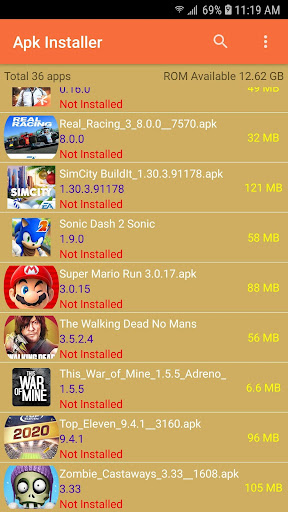
APK Installer automatically scans your device for .apk files and displays them in a clean, easy-to-navigate list. From there, you can:
-
📦 Install single or multiple APK files
-
🔎 View app information before installation
-
🗑️ Uninstall installed apps quickly
-
💾 Access APKs on both internal storage and SD card
-
✅ Install without root access or complex setup
It’s perfect for anyone who wants a simple and secure APK management solution.
Who Is It For?
APK Installer is ideal for:
-
💻 App developers testing APK builds
-
🌍 Users in regions with restricted access to certain apps
-
🔄 Those installing older versions or modified APKs
-
🛠️ Advanced users looking to bypass Play Store limitations
-
📱 Users with devices that don’t support Google Play
In short, if you’ve ever asked, “How can I install APK files easily on Android?” — this is your answer.
How to Use APK Installer
-
Download APK Installer from the Google Play Store.
-
Open the app — it will automatically detect APK files on your device.
-
Select the APK you want to install.
-
Tap “Install” and follow the prompts.
-
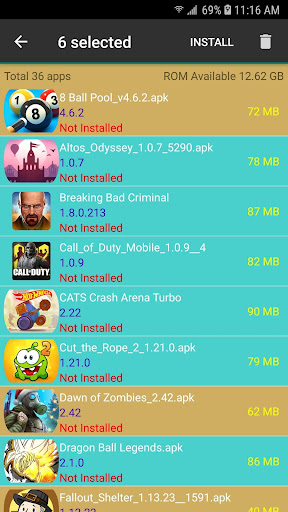
Optional: Choose multiple APKs and install them in batch mode.
No technical knowledge is required. Its user-friendly interface makes it perfect for beginners and advanced users alike.
Why Use APK Installer?
There are many reasons to choose APK Installer as your default APK manager:
✅ Fast & easy installation
✅ No ads or unnecessary features
✅ Does not require root access
✅ Lightweight and doesn’t slow down your device
✅ Supports all Android versions from 5.0 and up
✅ Free and regularly updated
Unlike manual installations that require navigating file explorers and system settings, APK Installer handles everything in one place—making the process faster, safer, and cleaner.
Apk Installer is a quick way to find and install apk files from your SDCARD
App Feature:
• Show correct apk file (Skip corrupt file)
• Scan apk files from External Storage and SD Card
• Display total apk files
• Batch install apk files by single click
• Batch delete apk files from External Storage and SD Card
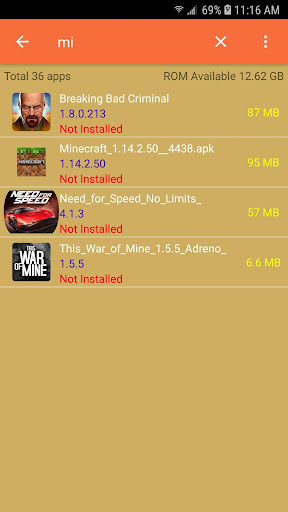
• Search apk file by name
• Apk file installed status
• Display free space memory
Note: We do not provide any apk files to download. Please check this before give us a negative review.
Conclusion: Total Control Over APK Installation
In today’s Android ecosystem, users need tools that are both powerful and safe. APK Installer by Braveheart Apps strikes the perfect balance. Whether you’re sideloading a beta version, installing older apps, or managing a collection of APK files, this tool makes it fast, easy, and secure.
📥 Download APK Installer today and take control of your Android experience.
The game/app Apk Installer has been tested and does not contain any viruses!
Updated: 27-07-2025, 12:29 / Price: 0 USD / Author: ApkAlone